Connect Retrixus to ChatGPT
Add Retrixus as a plugin in ChatGPT so it can search and read your Recurly data. Five minutes, one URL, and no keys to copy.
Once this is done, ChatGPT can answer questions about your Recurly data — and in a deep-research task it will search your records, read the interesting ones, and cite them in what it writes.
You need a ChatGPT plan that offers custom plugins, and an invitation to your organisation's Retrixus. As with Claude, this does not connect a Recurly site: if nobody has added one yet, start with the quickstart.
Step 1 — Open Plugins
In ChatGPT's left sidebar, choose Plugins. Not Settings — this is a top-level item, alongside Library and Agents.
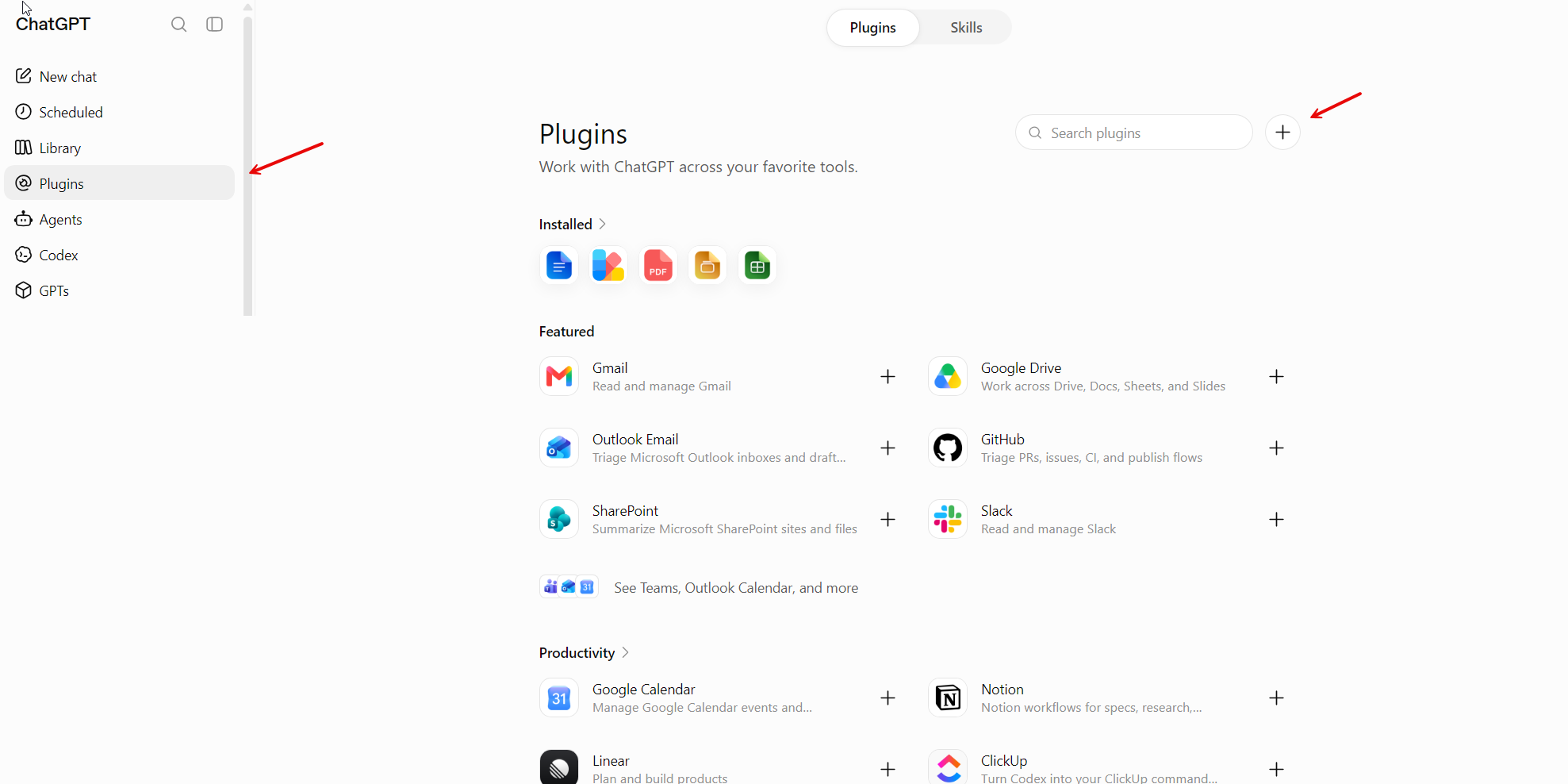
ChatGPT web, captured 2026-08-12. The two arrows mark the only two things you need on this page.
At the top right, beside the search box, there is a + button. That is how you add a custom plugin. It is easy to miss — there is no "add custom plugin" text anywhere on the page, just the plus.
Step 2 — Fill in the New Plugin dialog
Only two fields matter.
- Name —
Retrixus. The icon and description are optional; skip them. - Connection — leave it on Server URL (not Tunnel) and paste:
https://api.retrixus.com/mcp
- Authentication — choose OAuth.
Then tick I understand and want to continue under the risk notice. ChatGPT shows that warning for every custom plugin, because OpenAI has not reviewed it — reasonable of them, and worth reading once.
Step 3 — Leave the OAuth settings alone
Open Advanced OAuth settings if you want to see them. Everything is discovered from the server and the defaults are right:
- Registration method — Dynamic Client Registration (DCR) or Client Identifier Metadata Document (CIMD). Either works. Retrixus advertises support for both.
- Default scopes —
mcpis ticked. That is the only scope Retrixus issues. - Base scopes — leave empty.
There is no client ID or client secret to paste. Retrixus registers ChatGPT itself the first time it connects.
Choose Create.
Step 4 — Sign in
ChatGPT sends you to Retrixus to sign in with Google, then to a screen asking you to approve the connection. Use the email you were invited with.
"We don't recognise that account" means your address is not on your organisation's list yet. Ask whoever set up Retrixus to add it.
Step 5 — Ask something
Start a chat and ask about one of your sites:
Which Recurly sites can you see?
For a deep-research task, phrase it the way you would brief a colleague. Research works differently from a normal chat: it searches for records matching your question, fetches the interesting ones in full, then writes something with citations.
Look at our Recurly data and summarise what happened to failed payments last month — how many, which reasons came up most, and whether any customer was hit repeatedly.
What to expect, and what not to
Citations point at your Recurly site, not at individual records. Recurly publishes no shareable link for a single invoice or customer, so a citation opens the site dashboard and the record's identity is in the citation text. Better a link that works than one that looks precise and 404s.
Big totals are not what this is for yet. Questions like "total revenue this year" mean reading every invoice a page at a time. On a small site that is slow; on a large one Retrixus will say it cannot answer rather than grind. Why counting works this way.
Every answer names its site. If you have both a sandbox and a production site, the answer says which one it read. Worth checking before acting on a number.
If something is not right
No + button, or no Plugins in the sidebar. Two possible causes, and they are worth trying in this order.
First, check Developer mode: Settings → Security and login, then scroll to Developer mode and switch it on.
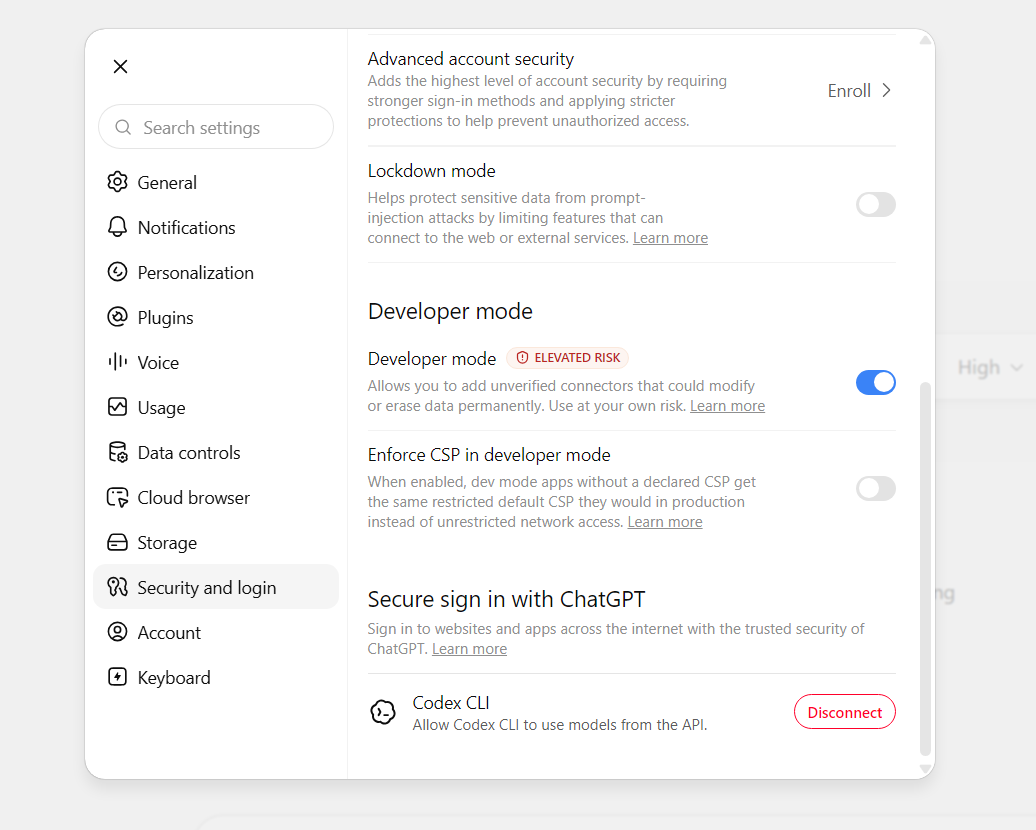
ChatGPT web, captured 2026-08-12.
We cannot tell you for certain whether this is required, and would rather say so than guess: it was already switched on for the account this walkthrough was written from, so the + route was never tested with it off. If you had to turn it on, please tell us and we will make it step zero.
ChatGPT labels developer mode elevated risk, and the warning is fair — it lets you add connectors nobody has reviewed. Retrixus is one of those, which is why the risk notice appears when you create the plugin. Anything Retrixus changes in Recurly is shown to you first, checked against your organisation's rules, and done only when you say yes. Leave Enforce CSP in developer mode alone either way.
Second, if the + is still missing, your plan may not include custom plugins. That is the one prerequisite you cannot check from inside the dialog.
It connects but finds nothing. Most likely no Recurly site has been added yet. Ask it directly — "which Recurly sites can you see?" — and it will tell you plainly.
Something differs from this page. Please say so. OpenAI moves this interface, and the menu names here were true on 2026-08-12.
Try it on your own Recurly data
Start free on one Recurly site. Connect Claude or ChatGPT and ask your first question in about 15 minutes.
Start free